

Back in February, I wrote a post about how I’ve been using AI, and I wanted to give an update halfway through the year, as someone who writes and researches economics and policy and feels like they’ve gotten their process into place. I also like it when other people do this (e.g., Matt Bruenig), so maybe it’ll encourage you to try it too, either in your own post or in the comments below. In this post I’ll go through how I research, write, and argue using AI, with a focus on how it helped me with our recent housing report.
This is specifically AI in the terminal: programs where agents run on your computer, in a folder you pick to host a project. These are programs like Claude Code, OpenAI’s Codex, or Google’s Antigravity. If, as Andrej Karpathy argues, the first age was copying-and-pasting from the web browser, then this second age is working iteratively on projects this way.
(I’m getting used to the likely third age, where AI just exists alongside your workflow. Through Claude Cowork, I get a daily update of my emails, Slack channels, calendar, and projects. When it comes to next steps on projects I’m managing, I have it scan documents and the recorded transcripts of all my meetings to summarize what’s happening. I’m excited to continue to expand that.)
But for now let’s stick with projects. In that previous post, I talked about how I use this quite a bit for data analysis, for investigative dives into topics I want to explore. I’ve found, especially with the latest versions like Opus 4.8, that I can open a folder, talk through a problem for it to investigate, and after about 20 minutes it comes back with a pretty in-depth look at it. Like the people at Anthropic, I rely on the “unreasonable effectiveness” of HTML as an output to display the information the agents produce.
One example: I’ve been studying the Acemoglu & Restrepo 2018 and 2019 core papers on task-based automation, apparently we all need theories of AI economics these days, and these are the standard, though complicated, references in the literature. To understand it better as I read it, I had Claude Code create a supplementary reading guide you can read here. It walked through the math derivation of the labor share formula at a dramatically slower pace (sorry Daron) with extra steps and clarifications so I have a small hope of following it. I understand we’re excited to speed up math discovery with AI, but I’m here to use it to slow it down, by, for example, explaining how exactly to understand the shadow price in the Lagrange optimization of a task-based aggregate output function. I then had Claude create additional tabs accessible at the top explaining how the equation values change, how the paper hit the literature as it existed at the time, how these debates existed historically, and then a literature review retrospective on how the papers have been incorporated since then.
You can get ambitious with these dives. I wanted to learn more about the American Time Use Survey (ATUS), both in and of itself and because Derek Thompson and others who post stats from it go viral on Substack. So I used my time with Fable 5 to have it study when the ATUS goes viral, and use that to come up with 63 potential hot takes, each of which could be a Substack post. It then downloaded the data and ran the numbers on each of them, determining which ones passed correctly, and sorted the accurate ones by a potential virality score. You can see the full HTML with tabs at the top for multiple summary levels here:
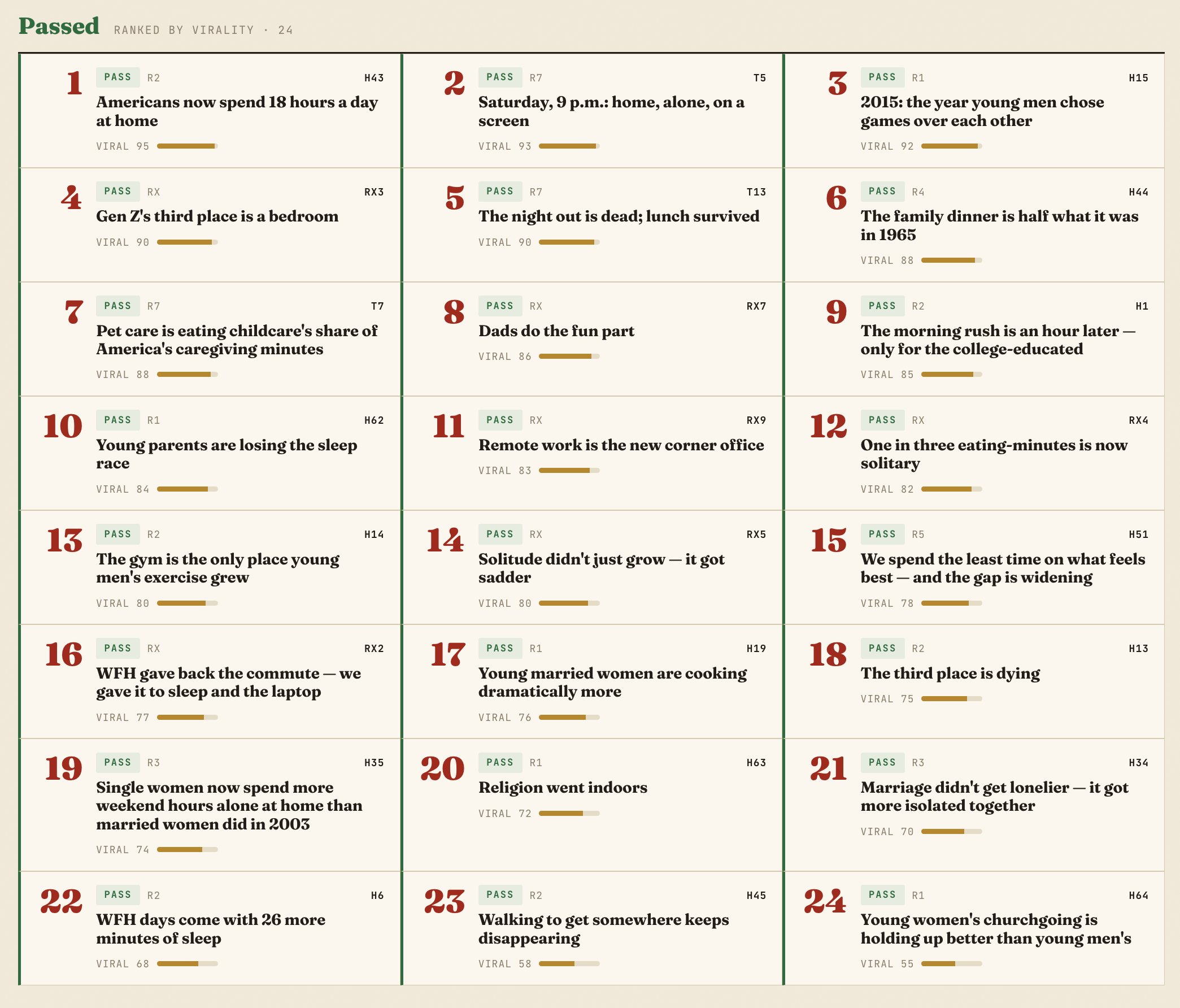
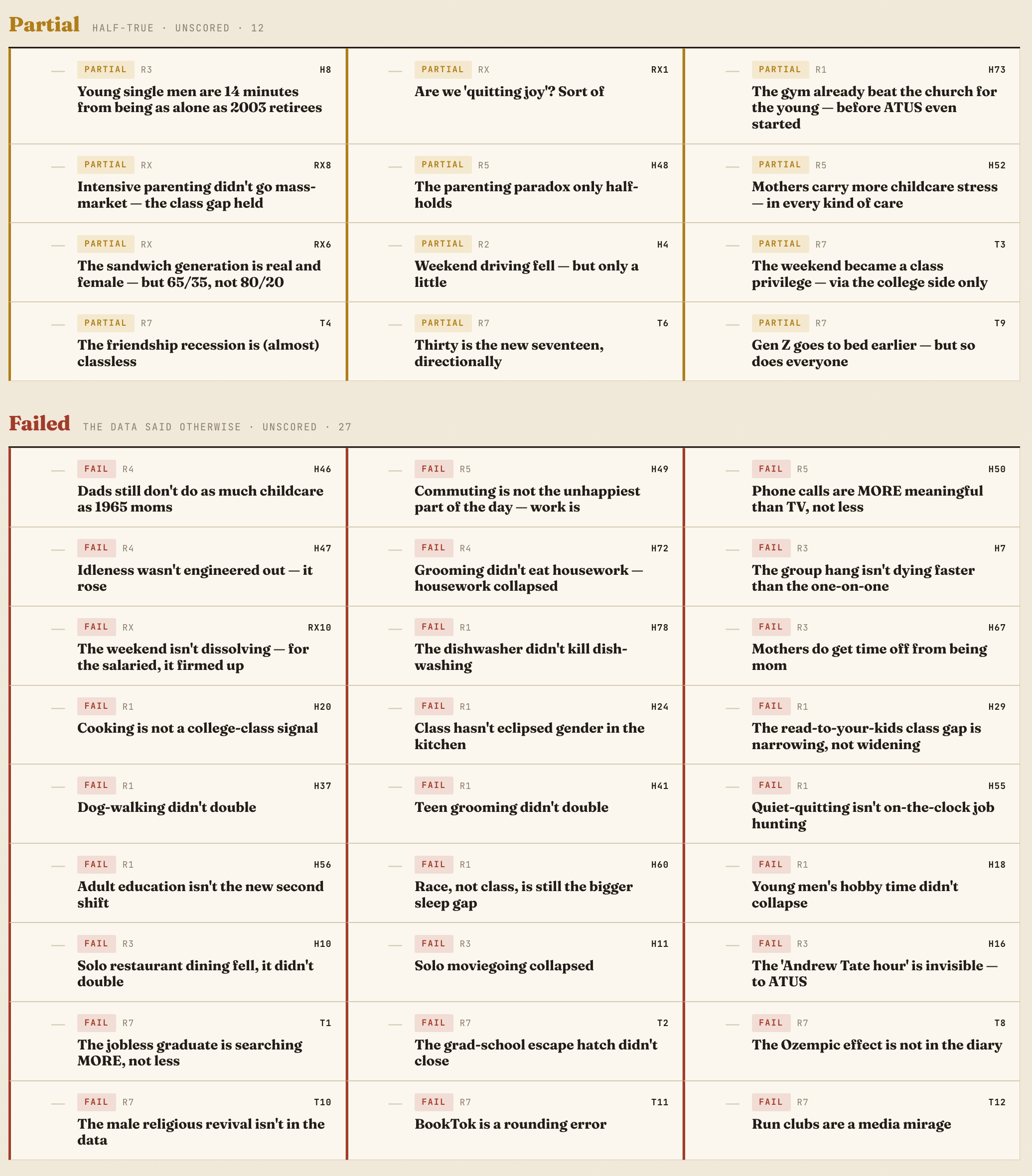
There are probably more productive uses of the frontier models.1 I’ll say that if you are using terminal AI agents, you should have personalized your own CLAUDE.md file. Just encouraging it not to write like AI gets you pretty far. I have also loaded an anti-slop writing skill (GitHub here) that does a pretty good job of forcing it out of the AI voice. I highly recommend we all start using something like this, because some of the stock formulations are really starting to kill me.
That’s what I had been doing. So what’s new?
Writing
Setup and Fact-Checking
I think I have figured out my workflow with writing and AI. I’ll use the recent housing report, Building Affordability: The Policy Agenda for America’s Housing Crisis, which I co-wrote with Becky Chao and Ned Resnikoff, and the subsequent blog posts as a jumping-off point. (I’ll clarify upfront that none of the report text itself was written with AI.)
If you are someone who writes and is uncertain about how to incorporate AI, let me make two suggestions. The first is to get a baseline familiarity with GitHub and the practices of git. This is essentially a sophisticated version of track-changes for computer code, though you can use it for text as well. Getting that set up goes beyond this post (but you can use AI to help!), but when it’s set up you’ll have normal folders on your computer that you can quickly and easily back up, that track every single change. This is the standard computer programmers use, where they need to be able to track every comma change across hundreds of files; regular writers can use it too.
The second is to try working in text with a .md file, called Markdown. It’s just a plain text file you can read with some markings for formatting. It’s not proprietary: you can read it in anything that reads text (I like MarkEdit and my own Draftwatch). Like the best of the internet, the late Aaron Swartz played a role in its creation. AIs work really well with it, getting better accuracy and token usage than PDFs. For any of your Google Docs, you can go to File -> Download, and one of the formats you can save to, besides a Word doc or PDF, is a .md file.
So to start, once we had a draft, I took the entire text of the housing report (about 40 pages of text) from Google Docs and downloaded it as a .md, put it in a folder, and asked Claude Code to give a list of obvious typos and grammar errors. Here’s what it found 57 seconds later:
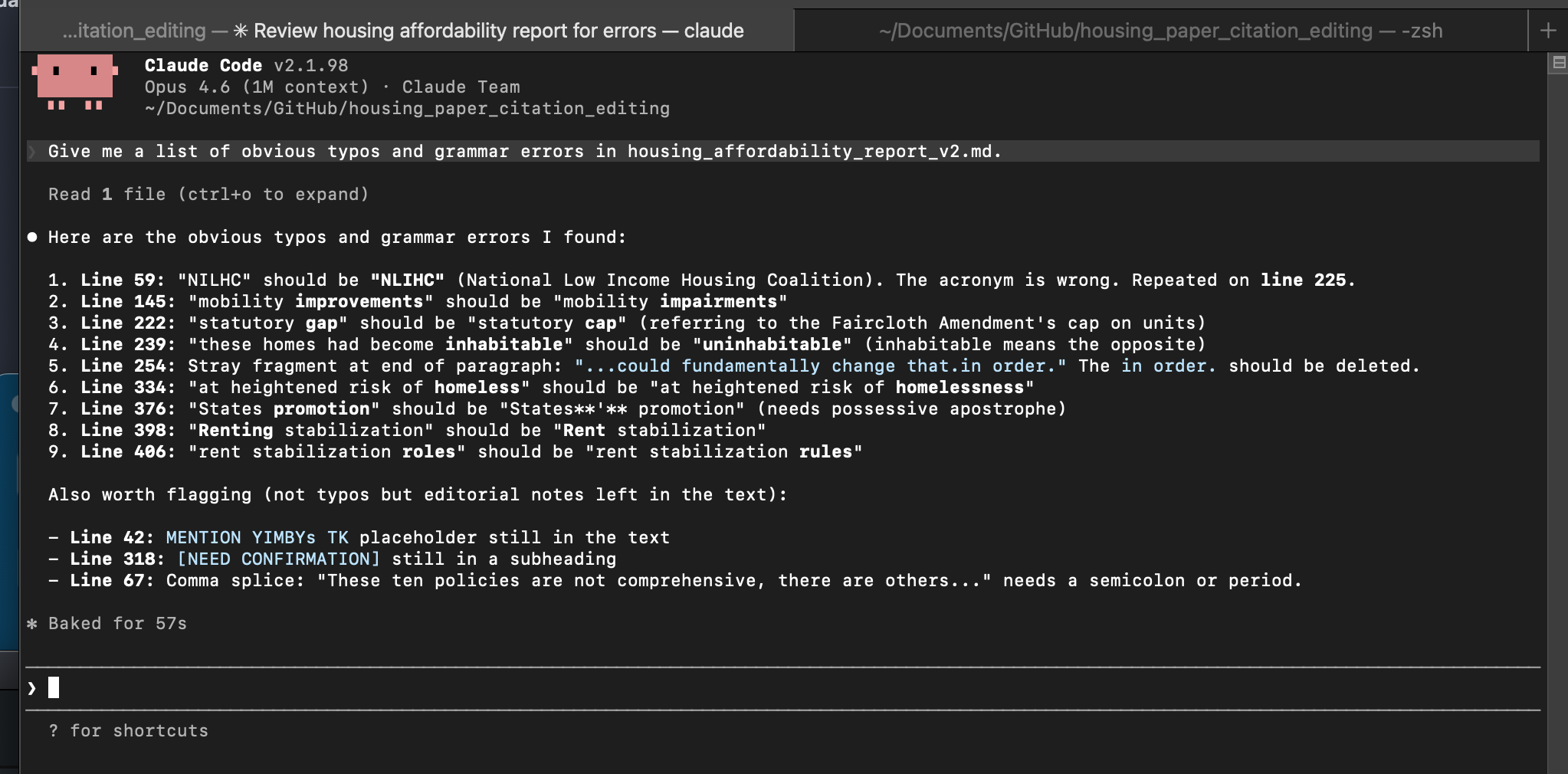
Some of them are a bit funny, and it was a good start, and after a few rounds that was clear. I then asked it to run a comprehensive fact-checking operation, after first coming up with a plan to tackle it in steps. It listed out how it would check the bibliography, and it also came up with a list of hundreds of facts that it proceeded to check and verify (we have .md links in this paragraph). This fact-checking works significantly better than if you were trying to do it in the browser, which I have done in the past, because it can write notes to itself, build an infrastructure in the folder, and go back-and-forth. It found a few potential errors or things it couldn’t confirm for us to check, citations it could confirm and those it couldn’t reach from the terminal web access (which we then just fed into the browser version of Claude which could). It was great to get this level of coverage, and to double-check them ourselves and fix them.
Editing
I wrote a few follow-up blog posts on the paper after it came out. My general process for writing is to start by dictating using Wispr Flow. I have a good sense of what I want to communicate in my head, but hate writing the first words, and speaking out the rough draft makes it much easier on me. I have AI clean up the transcription and then do my own pass of a full rewrite multiple times.
We want to be able to let AI rip but don’t want to destroy everything we spent time building. That’s true for civilization as a whole and also true for personal writing drafts. And that’s an awkward thing about editing with AI: if you ask it to make straightforward and targeted changes to something you’ve written, you can’t really be sure it isn’t also changing a ton of other stuff in the document too. Spot-checking is unreliable, and just manually making the suggested adjustments doesn’t save you much time.
Now here is where git pays off. I “commit” the draft so the current version is saved, then ask AI to edit the markdown. Here, below, for the draft of the blog post announcing the paper, I asked Claude Code “to fix typos and obvious errors. Also search the internet to add links to the cited papers and hunt down the missing factual TKs I don’t have here.” I then used git to look at the differences to see that that’s only what it did.2
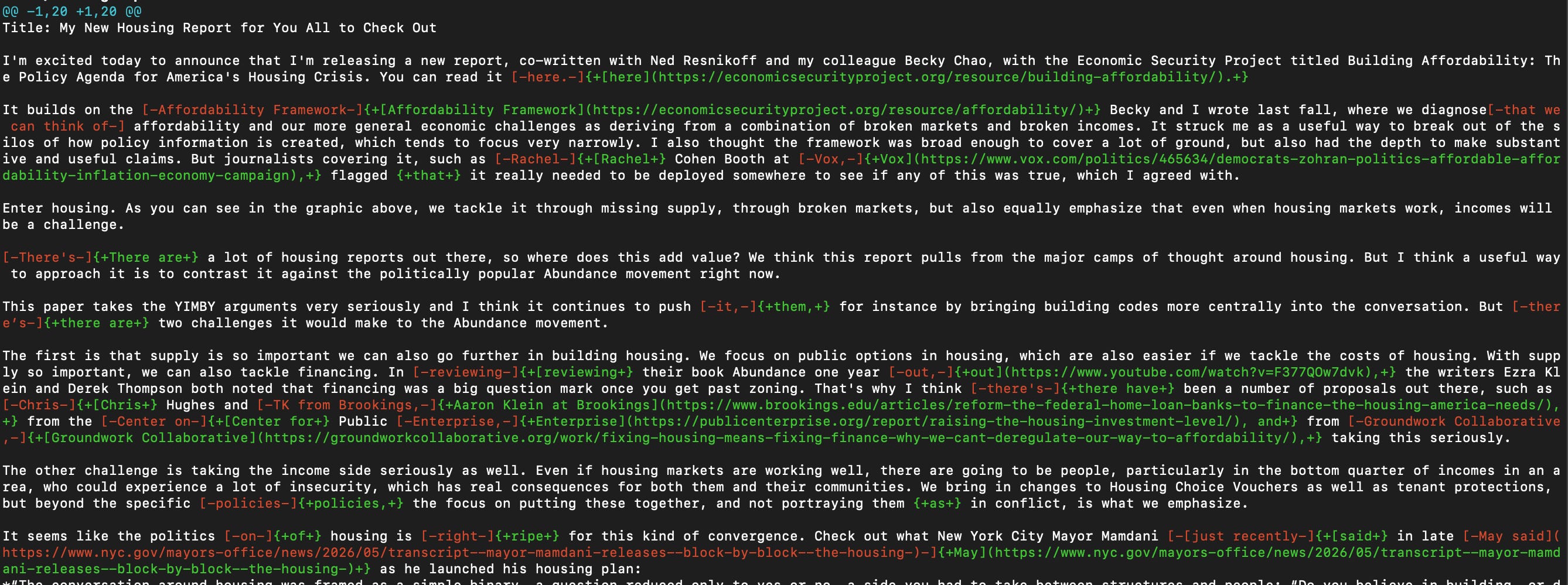
I have used Claude Code as an editor but it’s generally been a pain, because you can never be sure what else it changed; this process has fixed that for me. The AI has nothing to do with git showing the differences. As you can see it did only what I asked it to do, and I have confirmation there’s no odd hallucinations I’m missing. You can then commit that version again and iterate.
For my post on the ROAD to Housing Act, I did the above steps, and I also then asked Claude Code to suggest line edits that would make it read better. Here you can see what it suggested in the terminal, and from the git diff we can confirm that it made only those changes, which I can go back and edit myself.
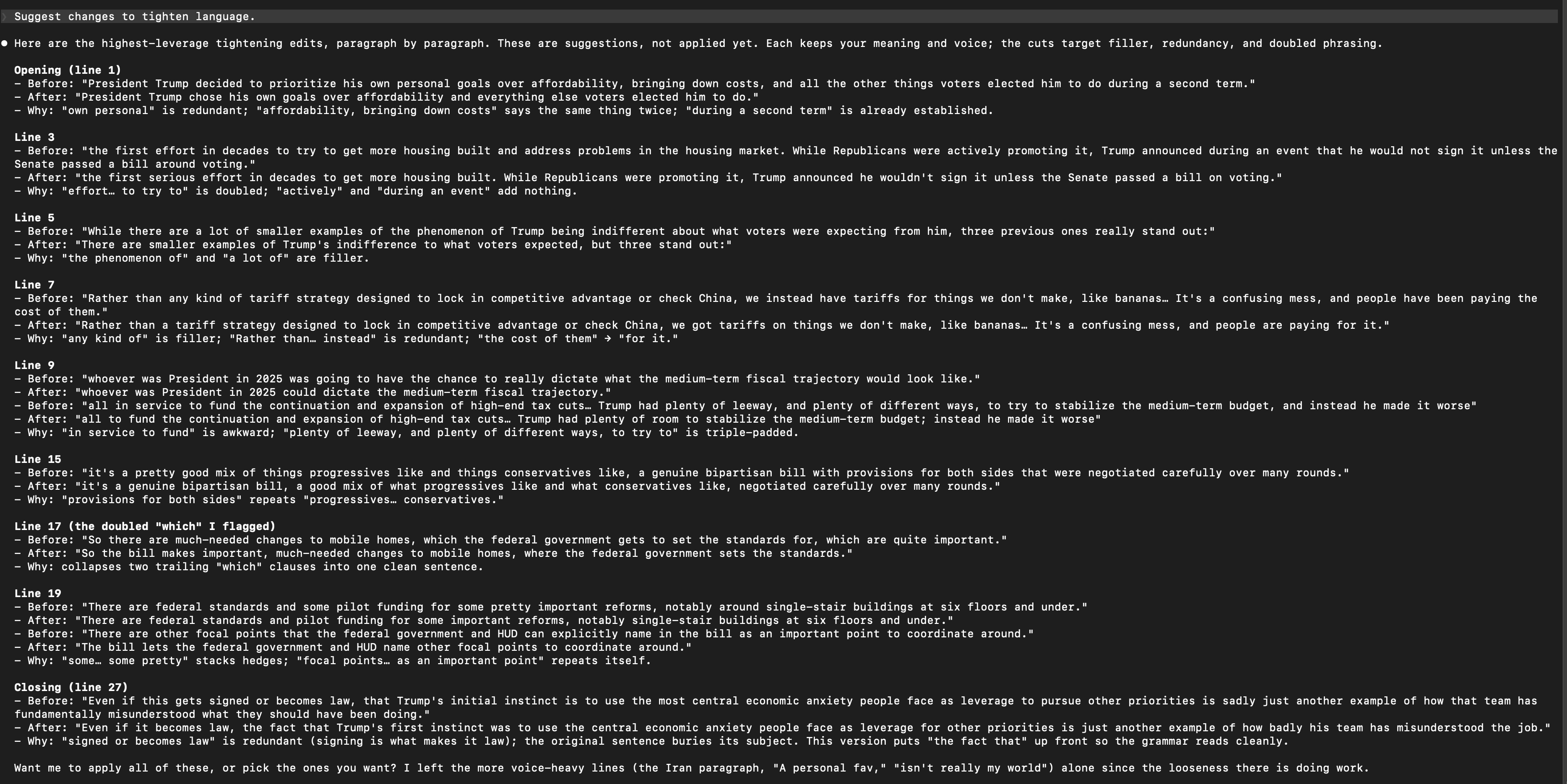
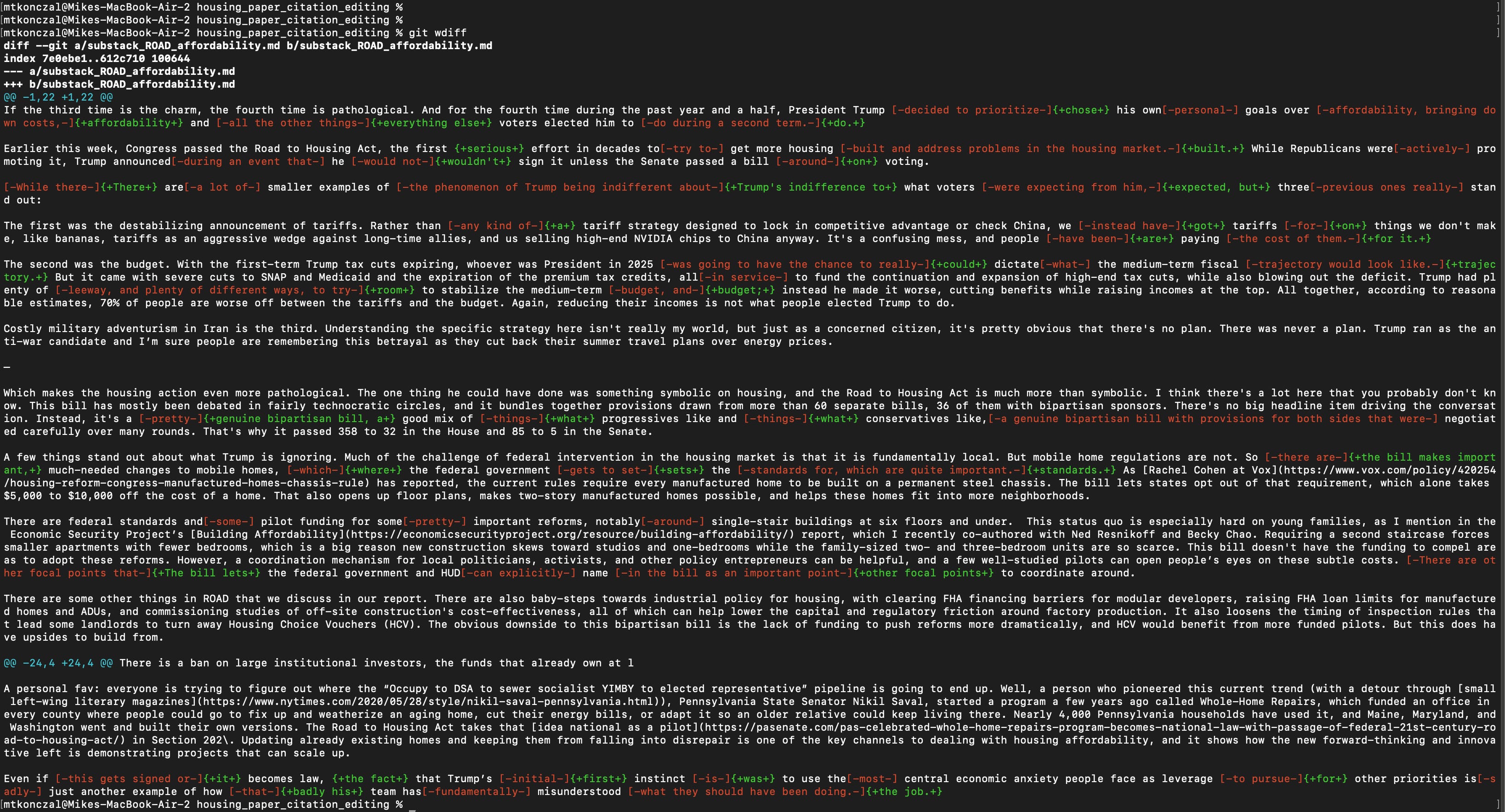
I’ve been professionally edited in plenty of settings, and this is what it feels like to have an editor go over your work at the line level and clean up awkward sentence structures. Coming from a computer science background originally, I view this as just the evolution of spellchecking and search, the way all computer processes have evolved in their sophistication and abstraction. But I can understand a variety of reactions to the technology and writing.
I decided to use my Fable 5 tokens to formalize this process into an IDE for writers that I’ve vibe-coded, which I’ll announce here in the future once it has been tested more. But for now I’ll mention it in a footnote if anyone wants to test it with me, I could use additional eyes.3
Side note: Has the writing peaked?
You may have caught that there was a lot of drama about Fable 5, the latest Claude model, which was released under tight export controls, briefly pulled to comply with a government directive, and then restored last week after the administration reversed course. During that initial period it was available, I put the .md file of my housing report in a folder, along with several supporting documents, press releases, and other prep materials, and asked it to write ten-minute remarks for a group of activists and campaigners, briefing them on the state of the ROAD to Housing Act from online sources, plus a summary of my report and what it covers. I gave it a minute-by-minute breakdown of how the remarks should flow, then told it to write. I then did the same exercise with Opus 4.8, the previous frontier Claude model, in a different folder.
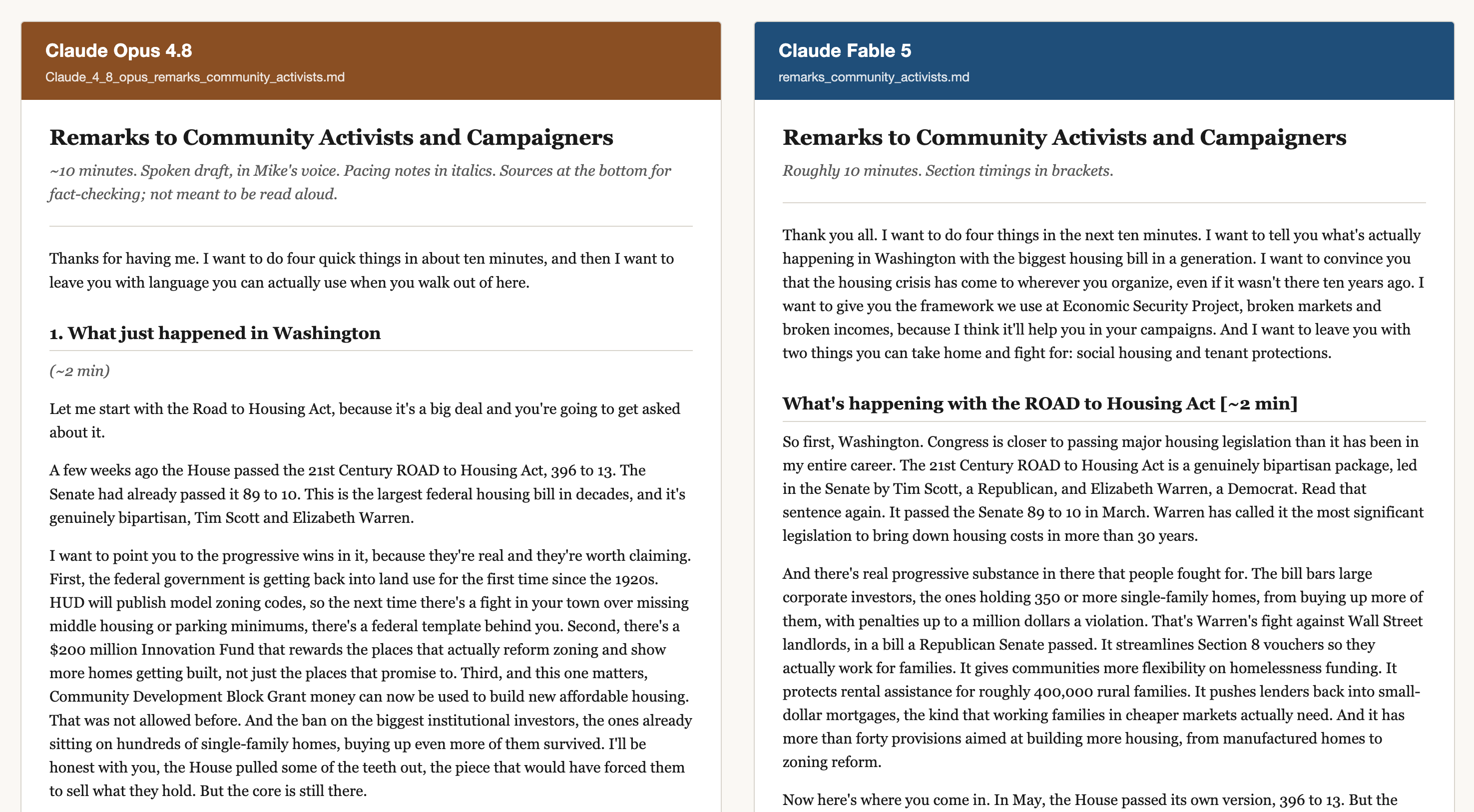
You can see both versions here, where I also asked Fable to summarize the differences at the top. Both of these are unusable. (I didn’t use them.) And while Fable 5 strikes me as much more sophisticated at coding from some of the other work I’m doing, including that IDE project, for writing I did not think it was a step up. It’s possible Moore’s Law won’t apply to creative writing, and we’ll just be stuck at the slop level. I don’t know if that’s good or bad.
Iterating Ideas Themselves
The other substantial difference in my workflow is using it to push back on my ideas, and to give me context for how to debate things. I understand the serious worry AI will flatten our thinking, but there is a world where AI could lead to deeper understanding for those who seek it. I have definitely used it to summarize things I could have read for more depth. But I’ve also used it to force better understanding of arguments. Anything I write goes through several “what is wrong with this? / what would opponents criticize?” rounds and I get clear answers.
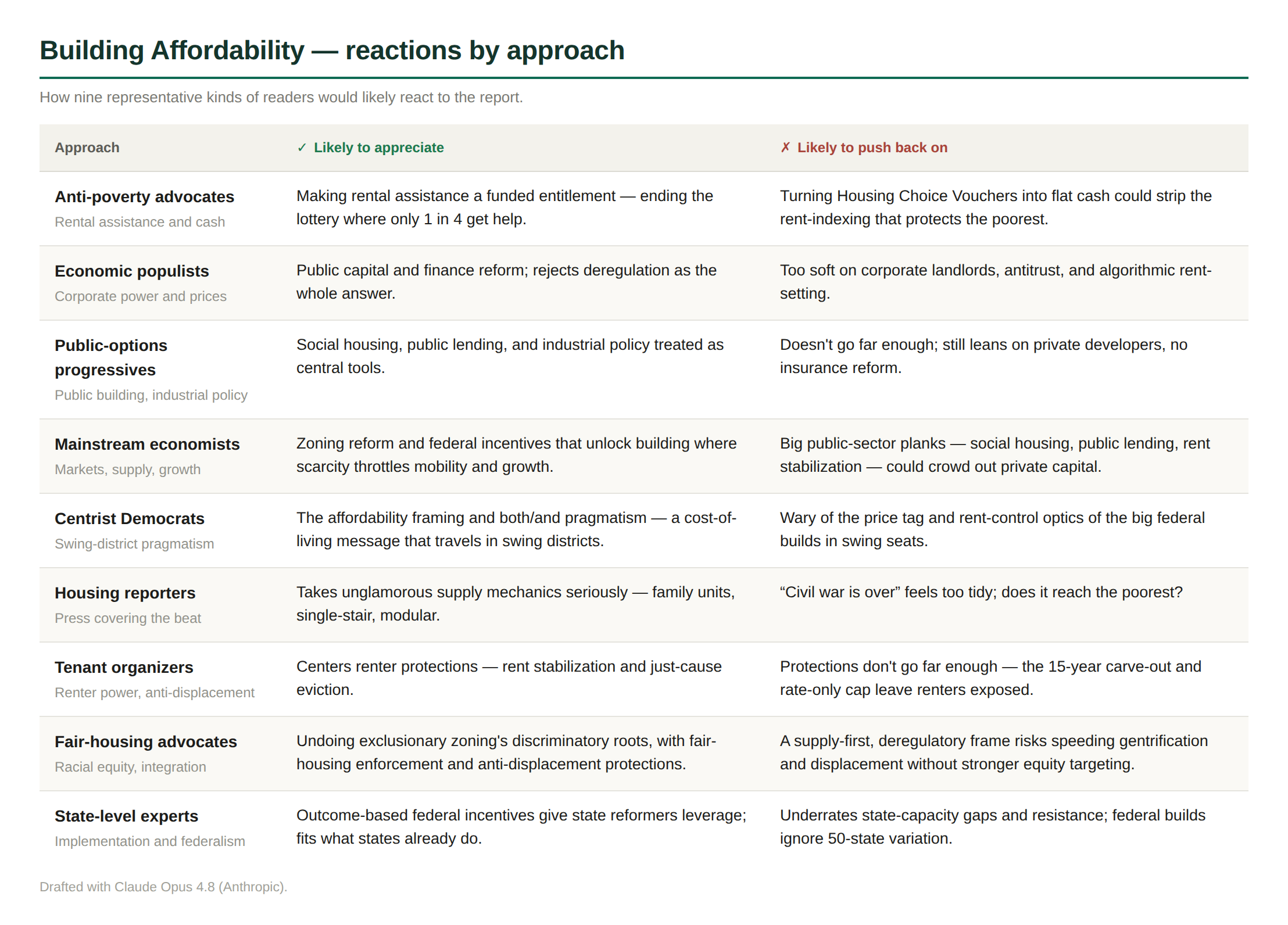
So I won’t share all these materials, but during the drafting of the housing report I would have AI consistently push back on the arguments, summarizing a wide range of different opinions. Here, for example, is how Claude Opus quickly summarized one thing nine different relevant actors would find appealing about the housing report, and one thing they would push back on or be skeptical about. This was helpful for me building the argument, and helpful for my organization to get a sense of any incoming criticism that might be on its way.
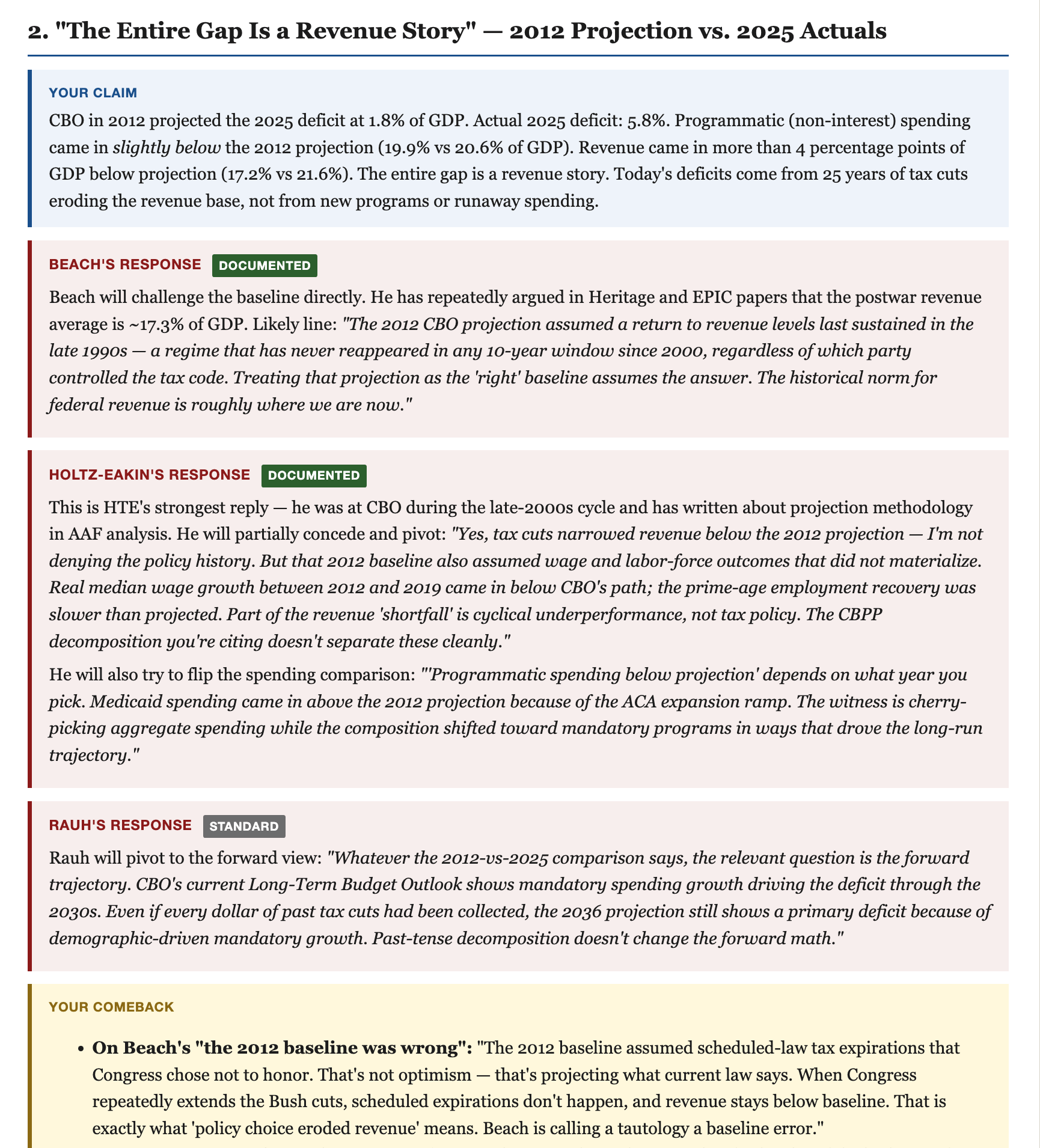
I can share a more in-depth example. I gave congressional testimony earlier this year on the debt and deficit. You may not know this, but minority witnesses at these hearings basically get a day or two to put it all together. While I was prepping, we got the names of the three majority witnesses and their testimony, so I had AI build a full HTML document.
It read everything the three of them had ever written, then laid out the best arguments it thought they’d make against my testimony point-by-point, along with responses I could give. A second tab also had it go through all their testimony and pull out what they had in common. Then it went through each of their claims in detail and flagged things for me to be aware of and answers to have on hand. Here, for instance, is how the AI understood how the Republican witnesses would respond to my second substantive claim:
I am aware that some of my favorite uses of this technology mirror the plot of the Nathan Fielder show The Rehearsal. So be it. These examples, and really the whole thing, don’t substitute for experience and judgment, for knowing which points are relevant and what to emphasize when. But the raw factual material and how it’s presented can be automated pretty quickly. The base case is a world flooded with slop. But there is a path for better and more interesting things to happen.
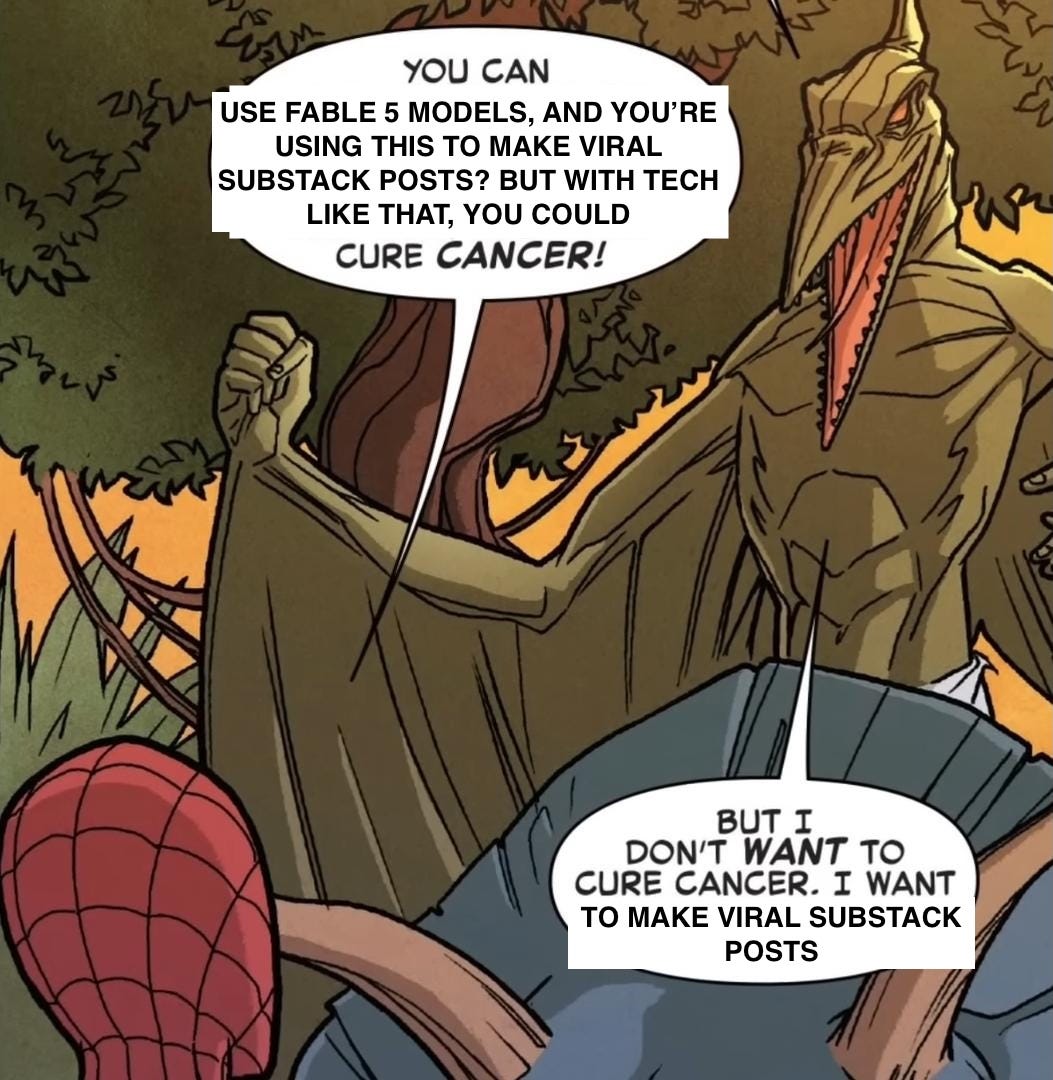
When Fable was first announced and then banned, all the elder dads at the MoCo playground started talking about it. There was a lot of “what did you do with your 72 hours of Fable?”
One dad said “I used Fable to one-shot a full GitOps CI/CD pipeline, reducing deployment times from 45 minutes to 90 seconds.”
I responded that I used it to reverse engineer a time diary to try to go viral on Substack. The response from the dads was similar to this meme:
I technically use git diff --word-diff=porcelain. Most IDEs and Google Docs itself uses just regular git diff, which shows the whole paragraph as highlighted if a word changes. Hence me building my own IDE below.
Is it too late to vibe code apps? That feels like a January 2026 idea. But either way, I finally understood the app I wanted to track changes on AI edits, and it wasn’t until Fable 5 that the vibe-coded architecture made sense. I’m going to do something more formal at a later date, but if you are interested in beta-testing a vibe-coded app, check out Draftwatch!
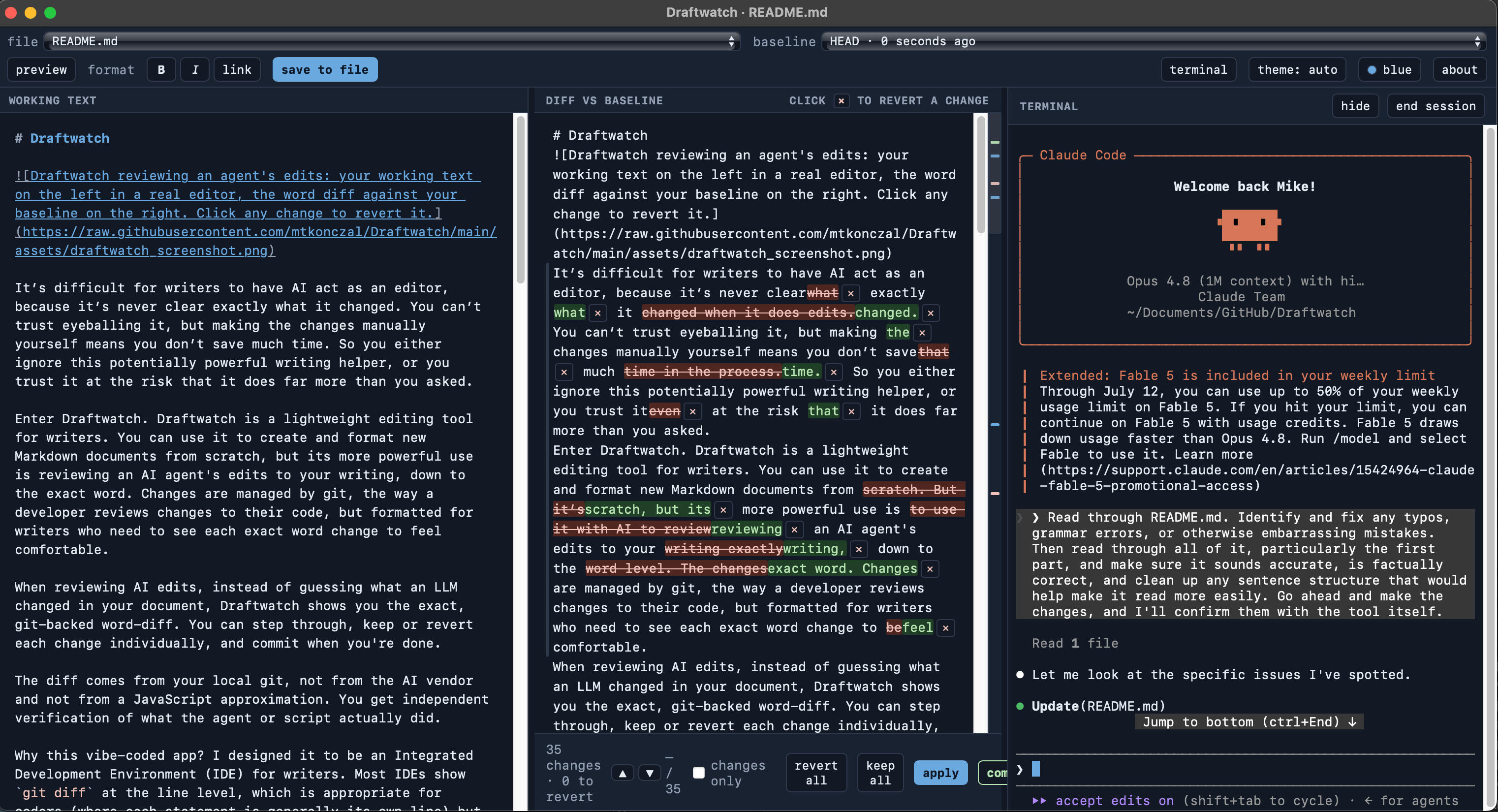
The diff comes from your local git, not from the AI vendor. You get independent verification of what the agent or script actually did.
Why this vibe-coded app? I designed it to be an Integrated Development Environment (IDE) for writers. Most IDEs show git diff at the line level, which is appropriate for coders (where each statement is generally its own line) but terrible for writers, who work at the paragraph level. This IDE is built around displaying git diff --word-diff=porcelain, which lets writers see the specific words being edited. Even the IDEs that do show this make it harder for writers to track edits, and they carry coding features and visual baggage that writers won’t need. Please leave comments if you use it!
Thanks for that! I marvel at what can be done with AI (e.g. Claude) and struggle with the problem of attribution. My first use was mainly as a glorified search engine. Then it became a research assistant (or a roomful of them), and finally morphed into a gifted dissertation advisor. And I haven't yet understood it's full value, so thanks for setting expectations.
Love these